Facebook : Add Friend Vs Subscribe Problem Solved by rafomac  

Posted by Unknown


Hai, It is So Hard If People Want to add me but they cannot, Shows only "Subscribe"
It s a common problem of Facebook.
No worries, I am here to help You

To add the "Add as a friend" button, follow these steps:

1) Click that arrow right next to the "Home" button on the top of the page
2) Go to "Privacy Settings"
3) Go to the "How You Connect" place and click on "Edit Settings"

4) The second option listed once you press that is "Who can send you friend requests?"
5) Click on that tab next to it and choose "Everyone"


Hope I helped!

To Watch Video Tutorial....See Below
In English

In Malayalam
SONY Viao Original Battery Detection, Hibernation Problem (Solved by rafomac)  

Posted by Unknown

"The installed battery may not be properly connected to the computer or may not be compatible with the computer. Click "OK" to enter Hibernate mode, and remove and reinsert the battery."


If u feel this Problem Don't Worry i will Help u...


I was geting this annoying message and system was going into hibernate mode.

"The installed battery may not be properly connected to the computer or may not be compatible with the computer.
Click "OK" to enter Hibernate mode,and remove and reinsert the battery. See the VAIO(R) User Guide for more information about using the battery."

I found this solution from Sony Support.


Follow these steps to fix this problem.
  1. Power off the notebook and remove the battery.
  2. Make sure only the AC adapter is connected and power on the notebook.
  3. Click the Start button, click All Programs , click Accessories , and then click Run .
  4. In the Run window, type MSCONFIG and then press the Enter key.
NOTE: If prompted for an administrator password or a User Account Control prompt is displayed, type the appropriate password, click Continue or click Yes .
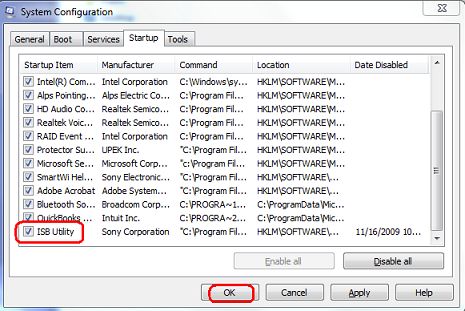
  1. In the System Configuration window, click the Startup tab.
    1. On the Startup tab, click to uncheck the box in front of ISB Utility .
Bat1.jpg
  1. Click the OK button.
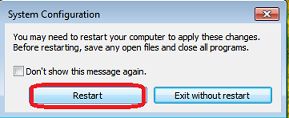
  2. In the System Configuration window, click the Restart button.


Bat2.jpg

  1. Power off the notebook, reconnect the battery and power back on. 
  2.  

ULTIMATE VOICE RECORDING SOFTWARE NO BEEP, For Nokia  

Posted by Unknown


Ultimate Portable Voice Call Recorder | Free Download

Hi everyone all around! I bring you today a very useful application for your smartphones and handhelds of symbian 3rd Edition, let it be Nokia N95 or LG, SonyEricsson, or Motorola. I am sure there are times when you are in a situation when you need the proof that someone actually claimed something when talking to you over the phone and later when they meet you in person, they are saying “nope I didn’t say that”. And you feel the need, only if I could record that call of his, or only if I could reach ATT or Verizon Wireless headquarters and get that recording of the incoming call and make him or her hear what actually was discussed.
Well guess what, now you don’t need to run to your carrier and request them over and over again for getting that proof of the voice call ever, nor do you need any one as a witness in a conference call about what someone else talks about in the phone. Because now with this superb symbian mobile application you can record all your incoming and outgoing calls without any beeps, without the person on the other end even knowing about it and save it right at your phone memory card to listen to or play later. Yes, I present to you one of the most awesome application for symbian 3rd Edition phones ever released, I present to you the Ultimate Portable Voice Call Recorder.
To operate this useful application only takes a second because all you gotta do is assign a shortcut key after the installation so that whenever someone calls, you can press that key and it starts to record immediately. If you have a pen key assigned in your phone, then you can even use that as a default button for instant beep-less recording on the go. You can select the length of the recording, the quality of the recording, the type of files you want to save it as, and even password protect the files for security reasons so that no one else can hear it but you.
If you want to record only a single phone call or only phone calls from specific contacts or numbers, then you can simply add them in the list and VOILA! it starts to record only when they call or you call them. Likewise, you can even select to record incoming calls only or outgoing calls only, to specific or all numbers and contacts. You can easily sync the files with Nokia PCSuite and set an option to automatically delete the files from your phone once transferred. How cool is that?

Downloads:
CLICK HERE TO DOWNLOAD
Anyway, I am sure that you will be better off with this awesome application installed in your cell phone. So go ahead and please grab my feed and download it free for your Nokia symbian 3rd Edition phones like Nokia N73, N80, N91, Nokia E51, E50, N78, N96, N95, N91, 3250, N92, N82, E62, E65, E70, N93, N76, N71, N77, 6110, 6120, 5700 Xpress Music, 5710, 5310, 5300, E60, E61, N81 and E90.

ALL WINDOWS RUN COMMANDS by rafomac  

Posted by Unknown


Do in a matter of few clicks and text what will normally take several clicks to perform. There are, however, tools and utilities that I bet you never knew you had that can be accessed through the Run feature. The main reason most people don't use the Run feature is because they don't know the Commands.Some of these commands are not known to regular XP user and I strongly advise you to use only the ones you are sure of.

List Of All Windows Run Commands.

Click on the start Menu and Run any of the below shortcuts.

Add Hardware Wizard
hdwwiz.cpl

Add/Remove Programs
appwiz.cpl

Administrative Tools
control admintools

Automatic Updates
wuaucpl.cpl

Bluetooth Transfer Wizard
fsquirt

Calculator
calc

Certificate Manager
certmgr.msc

Character Map
charmap

Check Disk Utility
chkdsk

Clipboard Viewer
clipbrd

Command Prompt
cmd

Component Services
dcomcnfg

Computer Management
compmgmt.msc

Device Manager
devmgmt.msc

Direct X Control Panel (If Installed)*
directx.cpl

Direct X Troubleshooter
dxdiag

Disk Cleanup Utility
cleanmgr

Disk Defragment
dfrg.msc

Disk Management
diskmgmt.msc

Disk Partition Manager
diskpart

Display Properties
control desktop

Display Properties
desk.cpl

Display Properties (w/Appearance Tab
Preselected)
control color

Dr. Watson System Troubleshooting Utility
drwtsn32

Driver Verifier Utility
verifier

Event Viewer
eventvwr.msc

File Signature Verification Tool
sigverif

Findfast
findfast.cpl

Folders Properties
control folders

Fonts
control fonts

Fonts Folder
fonts

Free Cell Card Game
freecell

Game Controllers
joy.cpl

Group Policy Editor (XP Prof)
gpedit.msc

Hearts Card Game
mshearts

Iexpress Wizard
iexpress

Indexing Service
ciadv.msc

Internet Properties
inetcpl.cpl

IP Configuration (Display Connection
Configuration)
ipconfig /all

IP Configuration (Display DNS Cache Contents)
ipconfig /displaydns

IP Configuration (Delete DNS Cache Contents)
ipconfig /flushdns

IP Configuration (Release All Connections)
ipconfig /release

IP Configuration (Renew All Connections)
ipconfig /renew

IP Configuration (Refreshes DHCP &
Re-Registers DNS)
ipconfig /registerdns

IP Configuration (Display DHCP Class ID)
ipconfig /showclassid

IP Configuration (Modifies DHCP Class ID)
ipconfig /setclassid

Java Control Panel (If Installed)
jpicpl32.cpl

Java Control Panel (If Installed)
javaws

Keyboard Properties
control keyboard


Local Security Settings
secpol.msc

Local Users and Groups
lusrmgr.msc

Logs You Out Of Windows
logoff

Microsoft Chat
winchat

Minesweeper Game
winmine

Mouse Properties
control mouse

Mouse Properties
main.cpl

Network Connections
control netconnections

Network Connections
ncpa.cpl

Network Setup Wizard
netsetup.cpl

Notepad
notepad

Nview Desktop Manager (If Installed)
nvtuicpl.cpl

Object Packager
packager

ODBC Data Source Administrator
odbccp32.cpl

On Screen Keyboard
osk

Opens AC3 Filter (If Installed)
ac3filter.cpl

Password Properties
password.cpl

Performance Monitor
perfmon.msc

Performance Monitor
perfmon

Phone and Modem Options
telephon.cpl

Power Configuration
powercfg.cpl

Printers and Faxes
control printers

Printers Folder
printers

Private Character Editor
eudcedit

Quicktime (If Installed)
QuickTime.cpl

Regional Settings
intl.cpl

Registry Editor
regedit

Registry Editor
regedit32


Remote Desktop
mstsc

Removable Storage
ntmsmgr.msc

Removable Storage Operator Requests
ntmsoprq.msc

Resultant Set of Policy (XP Prof)
rsop.msc

Scanners and Cameras
sticpl.cpl

Scheduled Tasks
control schedtasks

Security Center
wscui.cpl

Services
services.msc

Shared Folders
fsmgmt.msc

Shuts Down Windows
shutdown

Sounds and Audio
mmsys.cpl

Spider Solitare Card Game
spider

SQL Client Configuration
cliconfg

System Configuration Editor
sysedit

System Configuration Utility
msconfig

System File Checker Utility (Scan
Immediately)
sfc /scannow

System File Checker Utility (Scan Once At Next
Boot)
sfc /scanonce

System File Checker Utility (Scan On Every
Boot)
sfc /scanboot

System File Checker Utility (Return to Default
Setting)
sfc /revert

System File Checker Utility (Purge File
Cache)
sfc /purgecache

System File Checker Utility (Set Cache Size to
size x)
sfc /cachesize=x

System Properties
sysdm.cpl

Task Manager
taskmgr

Telnet Client
telnet

User Account Management
nusrmgr.cpl

Utility Manager
utilman

Windows Firewall
firewall.cpl

Windows Magnifier
magnify

Windows Management Infrastructure
wmimgmt.msc

Windows System Security Tool
syskey


Windows Update Launches
wupdmgr

Windows XP Tour Wizard
tourstart

Wordpad
write

Ways to Get or Drive More And Huge Traffic To Your Blog by rafomac  

Posted by Unknown


We all believe that there are factors that make blogs much better than other Web Pages, including the speed at which blogs are indexed, the ability to submit to blog directories & normal directories, pings and track backs. All these factors helps to drive huge traffic to your blog and give more visibility to blogs and can even get you more Pagerank from google if you can carefully read the factors below.
1. Publish short posts frequently.
Short post are very popular and common among readers, writing and publishing short post will give great visibility to your blog and short posts dont take much time to write. Try to make short post on daily basis.
2. Submit Your Blog To My Yahoo.
When you submit your own RSS to My Yahoo it is automatically indexed by Yahoo and you will have great visibility.
3. Submit to Google’s reader.
When you submit your own blog RSS to Google’s Reader the Google Blog Search will index your site for you and you will also have great visibility.
4. Trade Link.
Contact blog users to exchange link as much as you can it increases link popularity.
5. Ping your posts.
Use ping sites like ping-o-matic. Ping your site each and every time you add a new post.
6. Comment on other blogs.
Do not just leave short comments alone whenever you comment on other blog. Make sure you Leave your link along side with your comments.
7. Submit to directories And submit Rss
Submit your blog to directories such as Blogcatalog and the rest and submit your rss to search engines as many as possible. Directories increase relevance and visibility with Google.
8. Link from your email.
Add a link to your blog in your e-mail signature block.
9. Use Forums.
Forums are one of the best places to go for advice. Go to forums and find problems to solve. Make sure you always leave your blog name.
10. Tag your blog.
Tagging is a new idea that has erupted across the web. Sites like Del.icio.us, Technorati and many others have a social feature that allows you to place your article under keywords or “tags” that everyone interested in that tag can see.
11. Pay For Traffic And Seo.
If you want to boost your site without any stress and you dont even want to submit your blog to any directory yourself, all you need to do is to pay for Taffic, G-boost, Seo and Link building in a good site like Ineedhits
 

How To Convert Your File From Any File To Any File Online by rafomac  

Posted by Unknown


Have you ever wanted to convert files without the need to download or use any software?....... Check Out the site below to convert your file from any file to any file you want.


1. DocsPal is a free online file converter that supports all kind of documents, video, audio, images, e-books and archives like microsoft word (doc, docx), powerpoint (ppt, pptx), excel (xls, xlsx), open office documents (odp, odt, ods), pdf, djvu, postscript; avi, mpeg, mkv, mp4, mov, flv, wmv, as well as video for iPhone, iPad, iPod, HTC, PSP, BlackBerry; mp3, wav, wma, aac, ac3, flac; chm, fb2, jpeg 2000 (jp2), png, photoshop documents (psd), tiff; 7z, jar, rar, zip and many others. Moreover, it offers an online viewer that allows you to view documents and images online directly in your browser, without having to install anything else.

2. ConvertFiles is capable of processing files up to 200 MB.
- Allows for more than 330 combinations of input and output file formats.
- Keeps your files secure and private. Uploaded files are destroyed immediately after being converted. They cannot be accessed by anyone. Converted files are kept on our servers for 24 hours and then they are destroyed by automated rules. Each link to a converted file is unique. It is made known only to the person who started the conversion. No links are accessible elsewhere. NEW: For increased security, you can delete your converted files yourself by clicking the "delete output file" option found right under the download link.
- Facilitates downloads from the world's most popular video-sharing websites such as YouTube and MetaCafe.
- Provides complete support for http, https and ftp links.


3. Zamzar is dedicated to helping you transform your songs, videos, images and documents into different formats. Their mission is:
"To provide high quality file conversion
for as many file formats as possible"

Others are:

youconvertit


All Nokia Phones Secret Codes by rafomac  

Posted by Unknown


Here i will list you all Nokia Phones Secret Codes and These Nokia codes will work on most Nokia Mobile Phones

*3370#
Activate Enhanced Full Rate Codec (EFR) - Your phone uses the best sound quality but talk time is reduced my approx. 5%

#3370#
Deactivate Enhanced Full Rate Codec (EFR)

*4720#
Activate Half Rate Codec - Your phone uses a lower quality sound but you should gain approx 30% more Talk Time.

#4720#
Deactivate Half Rate Codec.

*#0000#
Displays your phones software version, 1st Line : Software Version, 2nd Line : Software Release Date, 3rd Line : Compression Type.

*#9999#
Phones software version if *#0000# does not work.

*#06#
For checking the International Mobile Equipment Identity (IMEI Number).

#pw+1234567890+1#
Provider Lock Status. (use the “*” button to obtain the “p,w” and “+” symbols).

#pw+1234567890+2#
Network Lock Status. (use the “*” button to obtain the “p,w” and “+” symbols).

#pw+1234567890+3#
Country Lock Status. (use the “*” button to obtain the “p,w” and “+” symbols).

#pw+1234567890+4#
SIM Card Lock Status. (use the “*” button to obtain the “p,w” and “+” symbols).

*#21#
Allows you to check the number that “All Calls” are diverted to.

*#2640#
Displays security code in use.

*#30#
Lets you see the private number.

*#43#
Allows you to check the “Call Waiting” status of your phone.

*#61#
Allows you to check the number that “On No Reply” calls are diverted to.

*#62#
Allows you to check the number that “Divert If Unreachable (no service)” calls are diverted to.

*#67#
Allows you to check the number that “On Busy Calls” are diverted to.

*#67705646#
Removes operator logo on 3310 and 3330.

*#73#
Reset phone timers and game scores.

*#746025625#
Displays the SIM Clock status, if your phone supports this power saving feature “SIM Clock Stop Allowed”, it means you will get the best standby time possible.

*#7760#
Manufactures code.

*#7780#
Restore factory settings.

*#8110#
Software version for the nokia 8110.

*#92702689#
Displays - 1.Serial Number, 2.Date Made, 3.Purchase Date, 4.Date of last repair (0000 for no repairs), 5.Transfer User Data. To exit this mode you need to switch your phone off then on again.

*#94870345123456789#
Deactivate the PWM-Mem.

**21*number#
Turn on “All Calls” diverting to the phone number entered.

**61*number#
Turn on “No Reply” diverting to the phone number entered.

**67*number#
Turn on “On Busy” diverting to the phone number entered.

12345
This is the default security code.

press and hold #
Lets you switch between lines.

friendster counter